
Generative AI CRM ERP Integration: How to Connect AI with Business Systems?
The hype cycle of standalone chatbots has officially peaked. Forward-thinking enterprises realize that deploying generative AI as a disconnected assistant on a browser tab is like hiring a genius consultant but refusing to show them any of your company’s internal files. While generative AI is capable of writing copy or summarizing public web pages, it remains isolated and generic when kept in a separate sandbox. The real business value of artificial intelligence only unlocks when it is integrated into the systems where actual work happens.
To turn AI and ML services into a genuine operational engine, organizations must focus on CRM ERP integration. Customer Relationship Management (CRM) and Enterprise Resource Planning (ERP) systems are key to improving the enterprise’s customer relationships, financial data, and supply chain management. When generative AI is integrated directly with such platforms, it transitions from a generic text generator into an intelligent agent. This agent understands your actual clients, processes, and business logic.
A recent market overview shows a stark divide between isolated AI and integrated workflows. The McKinsey State of Organizations 2026 report claims that 88% of companies use AI on a regular basis, but only 39% of them have seen a positive impact on EBIT. At the same time, 21% of AI adopters have actively redesigned procedures to accommodate GenAI. It means that modern organizations will continue to hire AI developers and expert engineering talent for integrating platforms and accelerating the development timeline.
Ultimately, BCG’s AI Radar 2026 Survey of more than 1,800 executives reveals that only 26% of companies report tangible value from GenAI at scale. The clear takeaway is the following: a platform licensing alone is not enough. Yet the primary driver of enterprise ROI is end-to-end workflow integration linking AI to core databases.
Why Generative AI Needs Access to Business Systems
Many corporate teams still run into a critical wall. When they prompt a standard LLM, it responds with “typical data” like generic industry guidelines, boilerplate templates, and public-domain knowledge. The LLM has no concept of your customers, your custom pricing tables, or your current warehouse stock levels.
Standalone AI vs Connected AI
The difference between standalone AI and connected AI is night and day:
Feature
Standalone AI
Connected AI
Data Scope
Public web-scraped knowledge up to its training cutoff.
Real-time internal databases, customer details, and ERP software.
Contextual Awareness
Zero knowledge of active business operations or data silos.
Deep understanding of exact client history, active projects, and financial records.
Actionability
Can only generate suggestions or text files.
Can trigger automated workflows, execute data synchronization, and modify records.
User Value
High risk of generic “commodity” output.
Tailored, non-commodity insights that directly aid decision-making.
Data Scope
Standalone AI: Public web-scraped knowledge up to its training cutoff.
Connected AI: Real-time internal databases, customer details, and ERP software.
Contextual Awareness
Standalone AI: Zero knowledge of active business operations or data silos.
Connected AI: Deep understanding of exact client history, active projects, and financial records.
Actionability
Standalone AI: Can only generate suggestions or text files.
Connected AI: Can trigger automated workflows, execute data synchronization, and modify records.
User Value
Standalone AI: High risk of generic “commodity” output.
Connected AI: Tailored, non-commodity insights that directly aid decision-making.
Where Enterprise Data Lives Today
In a standard corporate setup, business processes are split between separate systems. Your customer data, communication logs, and active pipeline are locked in CRM software such as Salesforce, HubSpot, or Microsoft Dynamics. Meanwhile, your product inventories, fulfillment pipelines, transactional records, and financial and operational data reside within ERP software such as SAP, NetSuite, or Oracle.
When these platforms remain isolated, they create highly restrictive data silos. Employees must spend hours on manual data entry, hopping between tabs to copy and paste essential information from one interface to another. Such a disconnect directly affects trust.
A study published in the Journal of Personal Selling & Sales Management found that only 35% of respondents trust the accuracy of the data used with AI due to disjointed sources. Thus, by connecting GenAI across these databases, you bridge the gap, which enables the LLM to serve as a unified reasoning layer spanning your entire digital ecosystem.

YOUR AI SHOULDN'T BE GUESSING
Over a multi-year period, these continuous investments in infrastructure and engineering can easily eclipse the cumulative subscription fees of a ready-made SaaS alternative. If your custom solution fails to deliver highly specific productivity gains, the project quickly shifts from a competitive advantage to an expensive internal sinkhole.
What Can Be Integrated with Generative AI?
Integrating generative AI into an enterprise ecosystem involves connecting the model’s reasoning engine to three core database environments.
CRM Systems
Integrating CRM platforms with AI allows models to read/write directly to customer-facing records. The AI can analyze customer interactions, past purchase history, and lead scores to draft hyper-personalized emails. Also, it can summarize complex sales conversations or recommend specific upsell opportunities based on exact customer behavior.
ERP Platforms
AI integration with ERP and CRM platforms allows systems to interact with the back-office brain of your business. When exposing the LLM to your ERP, it can query active inventory levels, analyze procurement times, and review historical financial statements. Besides, it can generate instant, natural-language executive summaries of cash flow.
Other Internal Systems
In addition to ERP and CRM, an enterprise-grade AI integration should tap into other critical data sources. This may cover:
- Internal knowledge bases (SharePoint, Confluence, and Wiki repositories)
- Communication channels (Slack and Microsoft Teams)
- Specialized operational databases (product lifecycle management software or field service databases)
CRM vs ERP vs Other Enterprise Systems: What Should AI Connect to First?
When planning your AI roadmap, choosing the starting point is critical. Different integrations serve distinct business functions and yield different types of value.
CRM Integration
- Focus: Customer interactions, conversion rates, and front-office pipelines.
- What it connects: Leads, contacts, opportunities, and support tickets.
- Why start here: It makes a direct impact on the client experience and encourages your sales teams to close deals faster due to the reduced number of tedious data entry tasks.
ERP Integration
- Focus: Core business operations, finance, manufacturing, and supply chain management.
- What it connects: Ledger transactions, bills of materials, warehouse stock, and procurement schedules.
- Why start here: It reveals operational inefficiencies and streamlines massive datasets that are traditionally hard for humans to parse quickly.
Knowledge Bases and Document Repositories
- Focus: Internal company policies, technical specifications, and legal documents.
- What it connects: PDF guidelines, legacy SOP documentation, and HR wikis.
- Why start here: This is often the fastest way to implement a Retrieval-Augmented Generation (RAG) system, providing an immediate productivity boost to your internal teams.
Which Integration Delivers the Highest ROI?
- Every business is unique. Meanwhile, statistics from enterprise deployments show that integrating CRM platforms with AI often delivers the fastest ROI by accelerating the sales cycle and boosting customer satisfaction.
- So, can CRM be integrated with ERP? Absolutely. The key benefits of long-term strategic growth are achieved through full-scale ERP and CRM integration. Combining front-office customer data and back-office operational data under a single AI reasoning framework prevents errors, optimizes cash flow, and helps your finance teams make highly accurate, automated predictions.
- According to an independent AI ROI Analysis of 200 B2B Deployments, the median ROI for AI projects over 24 months reached +159.8%. Meanwhile, manufacturing integrations topped the list at +210%, and SaaS B2B integrations followed at +175%.
Common CRM and ERP Integration Use Cases for Generative AI
When planning your AI roadmap, choosing the starting point is critical. Different integrations serve distinct business functions and yield different types of value.
Customer Support Automation
Instead of depending on rigid, pre-scripted chatbots, generative AI connected to CRM and ERP systems can address multiple complex issues end-to-end.
Example: A client asks, “Where is my order, and can I change my delivery address?” Then, the AI queries the CRM to confirm:
- Customer details
- Check the ERP for fulfillment status
- Verify the shipping carrier’s API
- Confirm whether the package has left the warehouse
- Draft a precise update
If allowed by your business rules, it can even update the shipping address directly in both platforms, ensuring total data consistency.
Sales Assistance
With deep CRM access, AI acts as a 24/7 copilot for sales reps. It can automatically monitor inbound customer emails, analyze sentiment, query past contract terms, and compose a tailored message that addresses the prospect’s exact pain points. It also removes the need for manual post-call summaries, automatically writing and logging tasks straight into the CRM solution.
Inventory and Procurement Insights
For businesses that manage physical goods, AI connected to an ERP will simplify inventory management.
Example: Your supply chain managers may ask, “Which of our key components are at risk of running out next month due to shipping delays?” Then, the AI will review active purchase orders, historical lead times, and current stock counts to flag probable bottlenecks.
Academic evaluations of agentic AI systems in logistics show that integrated architectures achieve 10% to 15% direct cost savings and a 9% to 12% gain in overall decision accuracy compared with legacy manual processes.
Financial Reporting Assistance
Forcing finance teams to spend days constructing pivot tables from raw ledger data is ineffective. On the other hand, GenAI can examine complex financial data on demand.
Example: Executive teams may ask for natural-language explanations: “Why did our operating margins in Western Europe decrease by 4% last quarter?” So, the AI reviews ledger transactions, transport costs in the ERP, and customer discount campaigns in the CRM to pinpoint the exact driver.
Internal Knowledge Search
By connecting your internal document databases with CRM history, your employees can quickly retrieve hard-to-find information. A field technician, for example, can query the system to find the exact manual instructions for a specific hardware version, linked to the client’s historical service logs.
Architecture of a Typical AI Integration
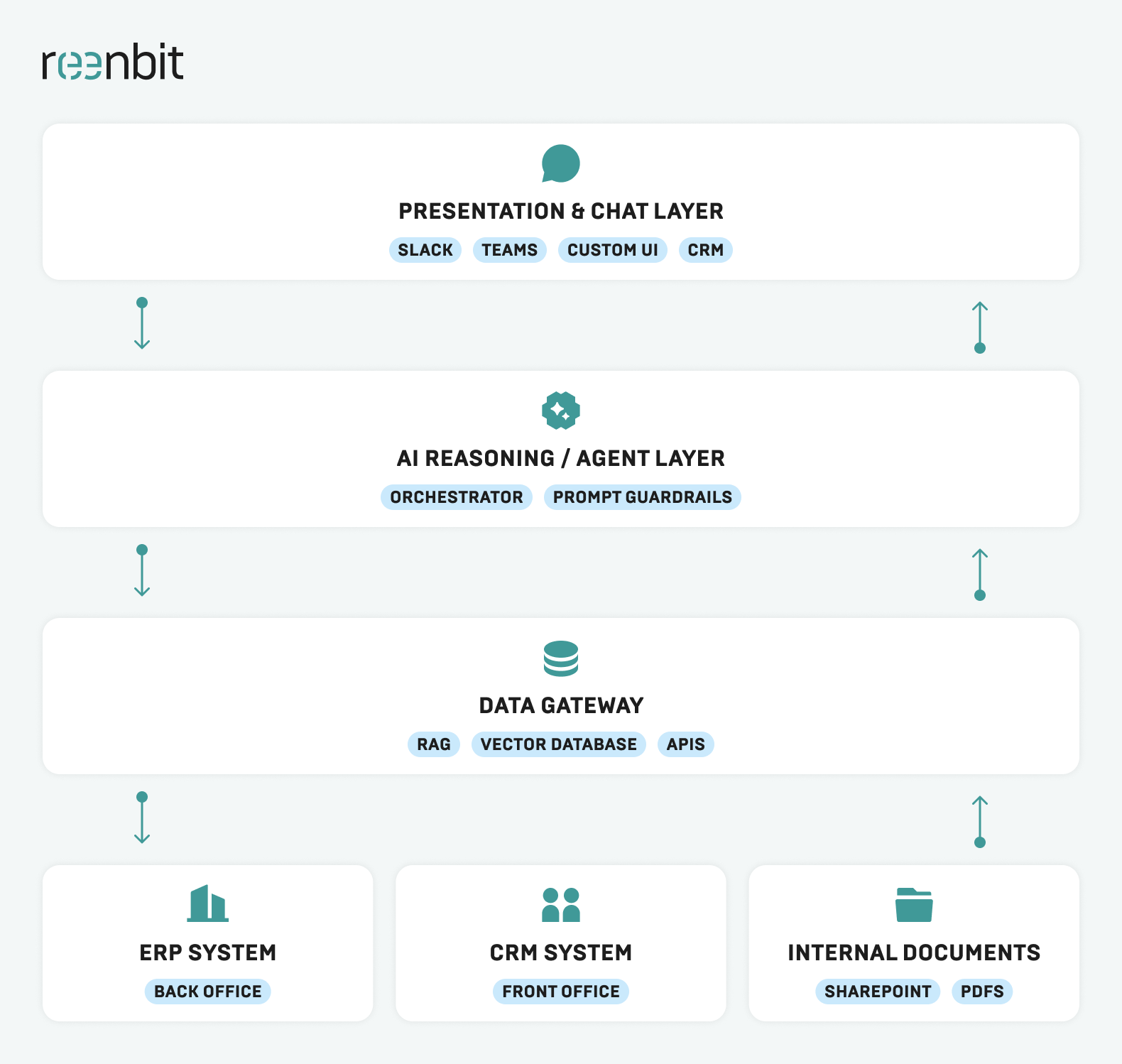
Now, the question is: how does it work under the hood? Instead of simply dumping files into an LLM, a solid CRM ERP integration architecture depends on a multi-layered, secure pipelinе.
APIs and Connectors
APIs serve as the basic pipes. If you aim to achieve instant data synchronization, the AI framework calls secure endpoints within your CRM and ERP. Thus, when a user asks a question, the AI:
- Parses the intent
- Converts the natural language into an API query
- Retrieves the raw JSON data
- Translates it back into a human-friendly answer
Retrieval-Augmented Generation (RAG)
To prevent the AI from hallucinating or generating standard responses, enterprises utilize RAG that does not retrain a massive model from scratch. RAG retrieves related document snippets or records on the fly based on the user’s particular prompt. It then feeds those factual references directly into the LLM context, guaranteeing that the generated answer is grounded entirely in your verified corporate data.
Vector Databases
For unstructured text files (such as contracts, PDFs, or communication logs), data is converted into numerical representations called “embeddings” and stored in a specialized vector database (such as Pinecone, Milvus, or pgvector). This allows the AI to perform semantic searches that match the conceptual meaning of a user’s query to the correct corporate documents, even if they do not use the exact same keywords.
Permission and Identity Management
When exposing sensitive data to AI, keeping strict security boundaries is obvious. Therefore, your integration architecture must enforce a process or ownership rule in which the AI inherits the user’s Active Directory permissions. Your junior sales rep may have no manual access to payroll records in the ERP. In this case, the AI must automatically exclude such records from its reasoning context to preserve secure, role-specific access.
Step-by-Step Process for Integrating Generative AI with CRM and ERP Systems
Successfully connecting AI to your core platforms entails a structured, phased plan. It will help you avoid system interruptions and ensure a high ROI.
Step 1. Define Business Objectives
Before writing a single line of code, you need to define integration scope parameters. Ask: What specific friction point are we trying to solve? Is it sales cycle acceleration, customer service response times reduction, or manual invoice entries automation? Fortunately, with clearly defined KPIs, your organization will prevent project creep and keep development teams focused on high-priority tasks.
Step 2. Audit Existing Systems and Data
Here, you must ensure your AI integration infrastructure can accommodate AI agents. It is essential to audit your current software suite, which often covers:
- Determining if your platforms are cloud-based or legacy on-premise systems.
- Identifying available API endpoints and assessing rate limits.
- Examining existing audit trails and logging systems to track how data moves between your platforms.
Step 3. Prepare Data for AI
AI is only as good as the data it reads. If your CRM or ERP contains duplicate entries, obsolete records, or conflicting contact details, the AI will produce incorrect or misleading outputs. Cleaning your databases, resolving conflicting fields, and establishing a single source of truth for your master data are important steps prior to initiating the integration.
Step 4. Connect AI Through APIs or Middleware
Utilize secure gateways or integration platforms, such as Azure Integration Services or custom middleware. They will help provide secure communication between AI models and your business platforms. Make sure that all data passing through these connections is encrypted in transit and at rest. In this case, you can maintain total conformance with industry regulations.
Step 5. Test, Monitor and Improve
At first, you should launch your AI integration to a small, controlled group of power users. This stage requires collecting feedback, evaluating system performance, and thoroughly monitoring output accuracy. Then, such real-world insights can be used effectively to adjust prompts, optimize vector search configurations, and continuously update the system. Such an approach will help you always adapt to shifting customer demand.
Challenges of CRM ERP Integration with Generative AI
While the benefits are clear, enterprises must navigate several technical and operational hurdles to achieve a successful rollout.
Data Quality
Poor data quality is the silent killer of enterprise AI projects. If your internal records are messy, the AI will confidently serve incorrect answers to your staff or clients. Establishing continuous automated data cleaning processes is essential to ensure high accuracy and reliability.
Security and Compliance
Exposing financial ledgers or customer files to LLMs requires you to adopt stringent security measures. Thus, you must ensure that your data is not used for training public foundation models. Also, integrations must strictly comply with local data privacy regulations, such as GDPR, HIPAA, or CCPA, for the proper protection of user confidentiality.
Legacy Systems
Many mid-market and enterprise companies still rely on legacy, on-premise ERP platforms. The bad news is that they lack modern REST APIs. Integrating modern, cloud-native generative AI with these older systems often requires building custom API wrappers, leveraging secure middleware, or deploying robotic process automation (RPA) tools.
User Adoption
Building an advanced integration is pointless if your team continues to perform tasks manually. To ensure high adoption rates, the AI interface must be highly intuitive and, ideally, embedded directly into the software systems your employees already use. So, they do not have to learn a new tool from scratch.
Best Practices for Enterprise AI Integration
To maximize the impact of your integration and ensure a smooth rollout, you must adhere to the following proven industry guidelines:
- Implement Prompt Guardrails. Put strict limits on what the AI can say and do, particularly when it interacts directly with customers.
- Enforce Human-in-the-Loop for Actions. AI can draft invoices, emails, or system updates. But a human employee should review and approve all these critical actions before they go live. That is why companies with Human-in-the-Loop governance deployments experience 4.2x fewer critical system incidents than those with fully autonomous implementations.
- Start with Internal Use Cases First. Test your integration internally (such as a sales assistant or an internal knowledge finder) to refine the model before deploying customer-facing applications.
- Adopt a Hybrid Architecture. Combine RAG for unstructured documents with structured API calls for real-time CRM integration with ERP lookups to get the best of both worlds.
- Use Semantic Cache to Reduce API Costs. Store common queries and their AI-generated answers in a semantic cache to reduce compute costs and speed up response times.
How to Choose the Right GenAI Integration Partner
Building a reliable, enterprise-grade AI integration requires partnering with a vendor that has deep expertise in cloud architecture, data engineering, and LLMs. Meanwhile, selecting the wrong one often results in delayed timelines, security issues, and failed user adoption.
When evaluating an integration partner, look for:
- Deep Cloud Expertise. Proven experience building secure systems on enterprise clouds like AWS or Microsoft Azure.
- Custom API Development Capabilities. The ability to build secure, high-performance middleware and custom wrappers for legacy software.
- Rigorous Security Protocols. A partner that understands corporate data compliance, encryption standards, and role-based access management.
The Reenbit Advantage
At Reenbit, we specialize in helping enterprises bridge the gap between advanced artificial intelligence and practical business software. Our dedicated team of engineers can help you design and build custom middleware, implement secure RAG pipelines, and integrate generative AI directly with your existing CRM and ERP systems.
We have successfully delivered high-performance cloud architectures, wrapped legacy on-premise systems in modern API layers, and deployed custom vector search capabilities. Reenbit’s goal is to ensure your AI applications deliver measurable business results rather than unfulfilled expectations.
Conclusion
Generative AI is rapidly becoming the central reasoning layer for the modern digital enterprise. Today, businesses are aiming to move away from generic, isolated chatbots and focus on CRM with ERP integration. This will allow them to break down restrictive data silos, automate repetitive manual tasks, and gain the true value of their corporate data.
The organizations that choose to integrate AI into their operational workflows today will build a steep, compounding competitive advantage that is incredibly difficult to replicate.
Ready to bridge the gap between your core databases and generative AI? Reenbit is here to build your secure, scalable integration. Contact our team today to schedule a consultation and turn your business data into your greatest operational asset!
FAQ
Can Generative AI connect directly to a CRM?
Yes. Generative AI can connect to a CRM through secure REST APIs. This allows the AI to read customer details, update communication logs, and log sales summaries in real time.
Can AI work with legacy ERP systems?
Yes, but it requires middleware. If your legacy ERP lacks modern APIs, developers can build custom API wrappers, utilize database connectors, or deploy robotic process automation (RPA) to serve as a bridge.
Is RAG required for ERP integration with CRM?
For structured data, such as inventory counts or invoice amounts, direct API queries are preferred to guarantee mathematical accuracy. RAG is highly recommended for unstructured data, such as contract agreements, communication logs, and internal policy guides.
How long does an enterprise AI integration project take?
A typical phase-one pilot integration (e.g., connecting a CRM to a secure, internal AI assistant) takes 8 to 12 weeks. Meanwhile, a full-scale, multi-system CRM and ERP integration with automated workflows generally takes 4 to 6 months.
What are the security risks of connecting AI to internal systems?
The primary risks include data leakage, unauthorized access to sensitive records, and model hallucinations. These can be mitigated by utilizing private cloud deployments, enforcing strict role-based Active Directory permissions, and adopting rigorous guardrails on model outputs.

