
AI Solutions for Enterprise: How to Evaluate AI Coding Assistants
With digital transformation moving faster than ever, CTOs and tech leaders must bring AI into organizations while preserving their values and standards. The need to act is obvious. Gartner expects that by the end of 2026, 40% of enterprise applications will use task-specific AI agents, compared to less than 5% in 2025. This rapid growth is driven by developers seeing real benefits, such as saving an average of 3.6 hours per week with AI coding tools.
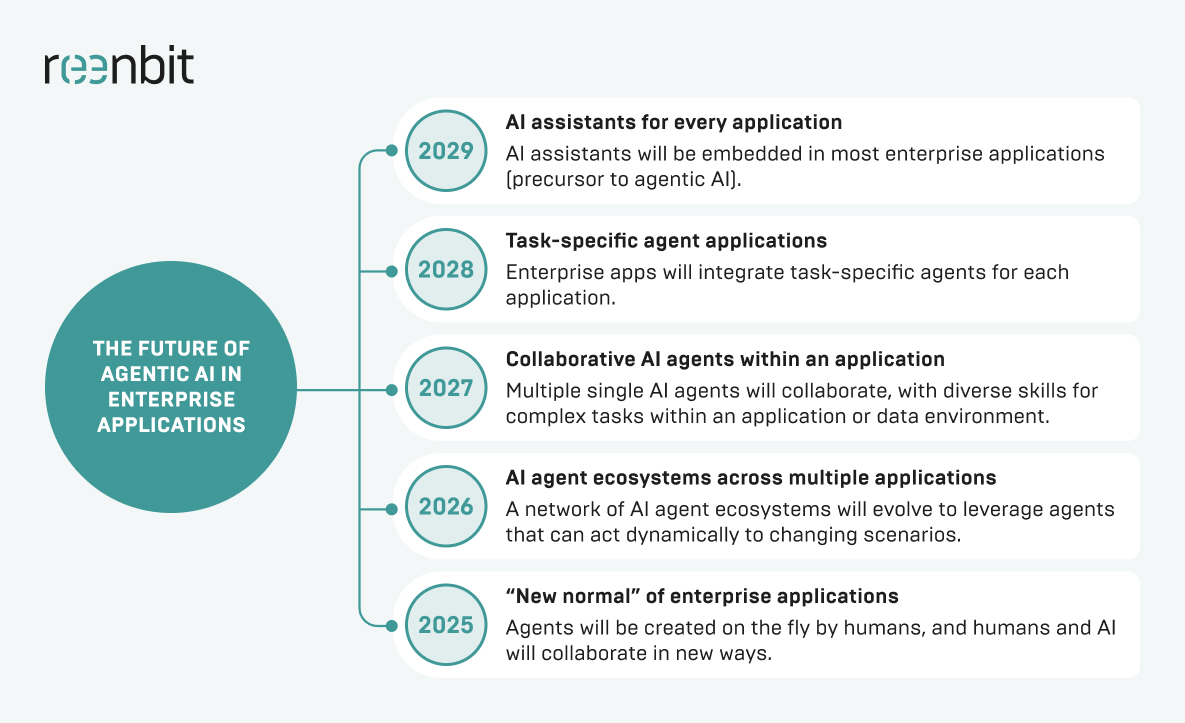
Enterprise AI solutions are changing the way large organizations solve tough problems. Generic AI tools might work for hobbyists, but companies need stronger data security, better scalability, and careful risk management.
AI coding assistants are among the most useful enterprise AI tools available today. As companies look for ways to stay ahead, these assistants help by automating repetitive tasks and improving the use of engineering resources. To get the most out of AI, it is critical to thoroughly review your options and ensure the software aligns with your company’s AI goals.
What Are AI Solutions for Enterprise?
To understand how to evaluate a coding tool, we must first define what AI is for the enterprise. Unlike consumer-grade apps, an enterprise AI solution is a robust platform built to handle enterprise data under strict governance. These AI systems can integrate with existing systems, ensuring seamless business operations while enhancing operational efficiency.
AI solutions for enterprise encompass a wide range of technologies, from machine learning models and natural language processing to generative AI and AI agents. Thus, AI for the enterprise is about transforming raw data into actionable insights for better decision-making. Whether in banking and finance fraud detection or AI-driven logistics workflows, such AI technologies can deliver business value at scale.

Build AI-assisted software the right way
What Enterprise Teams Expect from AI Coding Assistants
When teams add AI to the software development life cycle (SDLC), they want more than simple autocomplete. They look for robust AI tools that can truly boost productivity for data scientists and developers.
Key benefits include:
- Less Boilerplate: By automating data entry and repetitive code, developers can spend more time on system architecture
- Faster Onboarding: AI tools that use natural language queries help new hires learn company codebases. Studies show AI can cut onboarding time by up to 50%.
- Enhanced Code Consistency: Ensuring that code snippets align with internal business functions and style guides.
- Accelerated Debugging: Utilizing advanced AI to identify logic flaws before they reach the testing phase.
- Addressed Talent Gap: AI lets junior developers handle more complex work, making better use of team resources.
These advantages turn AI from a simple add-on into a key part of a stable development process. Meeting them helps companies control technical debt even as they move faster.
What Makes an AI Coding Assistant Enterprise-Ready
AI tools vary in quality. In a corporate setting, an enterprise AI tool needs to be secure and reliable. This means you must manage AI models inside a protected environment.
Security and Data Privacy Controls
Data security is essential for any enterprise AI solution. Companies need tools that keep their code private and prevent it from being used to train public AI models. Features such as “Zero Data Retention” and local VPC deployment are especially important.
Compliance and Governance Requirements
When using AI in regulated industries, companies must comply with rules such as GDPR, SOC 2, and HIPAA. The tool should also keep a record of how the AI accesses and uses enterprise data.
Admin Controls, User Management, and Policy Enforcement
An enterprise AI platform should let central IT manage licenses, set usage rules, and track AI use across departments. This helps prevent unsanctioned AI use and supports a unified company strategy.
Integration with the Enterprise Development Environment
To be useful, your assistant must work directly with the tools developers already use. This means strong integration with Azure, Google Cloud, and on-premises IDEs. So, adding AI will not interrupt daily workflows.
Key Criteria for Evaluating AI Coding Assistants
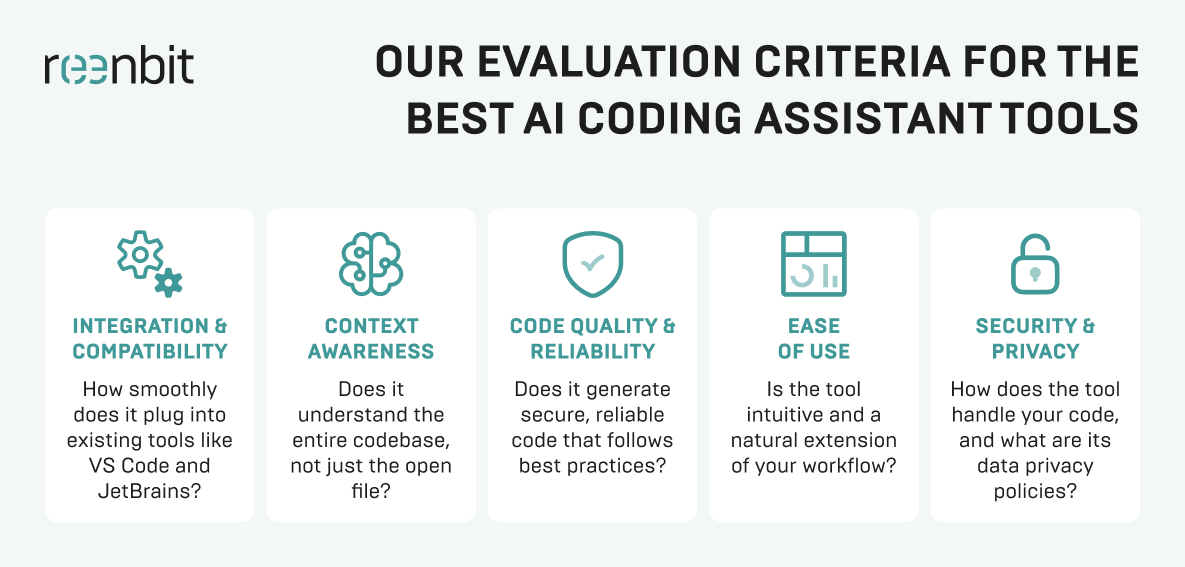
To find the best AI solutions for enterprise automation in the coding space, you must look under the hood of the machine learning models being used.
Code Suggestion Quality and Relevance
The AI software must provide logically sound suggestions within your project’s specific architecture. It should act as a senior partner that reduces cognitive load, rather than a snippet generator that requires constant manual correction.
Accuracy Across Languages, Frameworks, and Repositories
Advanced AI must be equally proficient in legacy systems as it is in modern Python for data science projects. The tool must support a “polyglot” stack to ensure that integrating AI will not create technical silos across your engineering teams.
Context Awareness for Enterprise Codebases
The biggest hurdle for generative AI is “hallucinations” or suggesting non-existent APIs. A tool is only enterprise-ready if it can securely analyze data from your private repositories. This will help provide context-aware suggestions that respect internal dependencies.
Support for Testing, Debugging, and Documentation
An advanced AI platform should automate repetitive tasks, such as writing unit tests and generating standardized documentation. Having AI-driven workflows handle these ones ensures long-term maintainability without sacrificing speed during tight release cycles.
Customization and Model Flexibility
Enterprises should evaluate if they can plug in custom AI models or fine-tune the system on their own raw data. Flexibility in how you manage AI models is essential for maintaining a competitive edge and meeting unique engineering standards.
How to Assess Security, Privacy, and Compliance Risks
When you implement enterprise artificial intelligence, the risk surface of your organization changes. You must treat AI adoption as a security project as much as a productivity one.
Here are some relevant tips for risk assessment:
- Verify Data Encryption: Ensure data is encrypted both in transit and at rest.
- Check Training Opt-Outs. Explicitly confirm that your private code is not being fed back into the large language models.
- Assess Intellectual Property (IP) Indemnity. Check if the vendor provides legal protection when the AI generates copyrighted code.
- Conduct Vulnerability Scanning. Use the AI to find bugs, but also scan the AI’s output for known vulnerabilities.
- Review Sub-processors. Learn which third parties are involved in the data processing chain.
Such tips are vital for protecting your firm’s digital assets. Establishing them early prevents the high cost of corrective compliance measures after the tech has already been integrated.
How to Evaluate Integration with Your Existing Enterprise Stack
An AI for enterprise solution that does not fit into your current workflow is a liability. You have to ensure the AI platform supplements your existing systems to drive business efficiency.
IDE and Developer Workflow Compatibility
Whether your team uses VS Code, IntelliJ, or Vim, the AI tools must provide a frictionless experience that feels native to the environment. Any lag in the customer experience for the developer will inevitably lead to low AI adoption rates and wasted resources.
Repository and Version Control Integration
The AI-powered assistant ought to have deep visibility into your Git providers to understand the history and evolution of your code. Thus, the advanced AI can provide suggestions that correspond with established patterns and branch-specific logic rather than generic solutions.
Compatibility with DevOps, CI/CD, and Internal Tools
The ultimate goal is to create AI-driven workflows in which the assistant suggests fixes during the CI/CD pipeline or helps analyze server logs. Integrating with these internal tools adds significantly more business value and speeds up the entire delivery lifecycle.
How to Measure Productivity and Business Impact
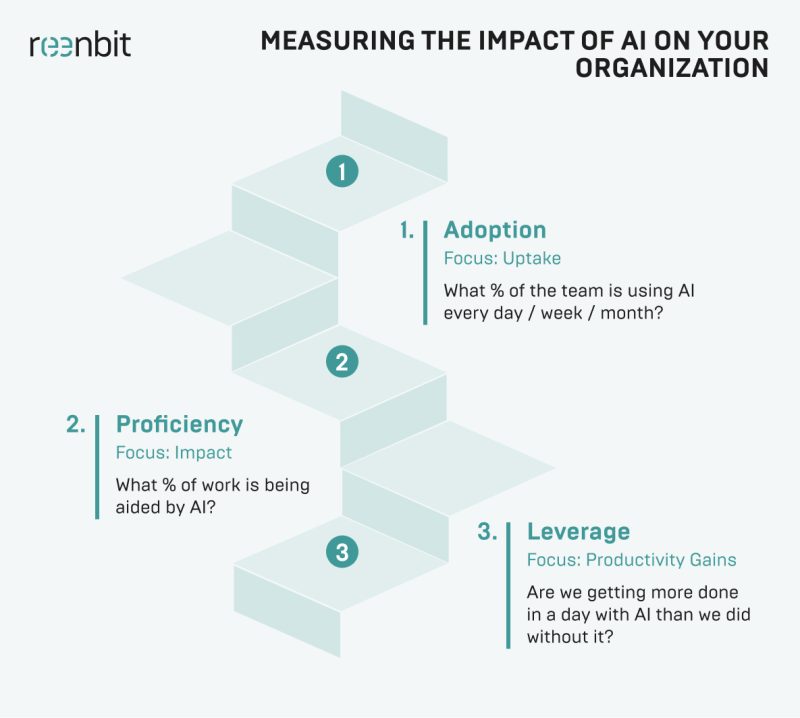
While AI for the enterprise sounds impressive, leadership will eventually demand a clear return on investment (ROI). This requires significant investment, making it vital to establish quantitative metrics that justify the spend and demonstrate long-term business value.
Developer Time Saved
Use data analysis to track the shift from manual data entry toward creative problem-solving. While it is hard to measure perfectly, tracking Jira velocity and developer pulse surveys offers clues about how much time is saved on core business functions.
Impact on Code Quality and Review Cycles
Monitor if the advanced AI reduces bugs during peer reviews and helps junior developers produce “senior-level” code more consistently. This boost in operational efficiency is a primary indicator that your AI strategy is successfully elevating the team’s output.
Effect on Release Velocity and Delivery Predictability
By helping optimize resource allocation, AI should lead to more predictable sprint cycles and a faster time-to-market for new enterprise AI applications. These AI-driven workflows reduce bottlenecks, allowing the organization to respond to market trends with much greater agility.
ROI Considerations for Enterprise Adoption
Calculate the total cost of ownership (TCO) against tangible hours saved across your dev team. You must also weigh the “cost of inaction”. Failing to implement enterprise AI risks losing your competitive edge to rivals who leverage these AI capabilities more effectively.
Common Risks of Adopting AI Coding Assistants in Enterprises
No digital transformation is without its pitfalls, and failing to manage AI models carefully may result in substantial technical debt. Organizations must balance the speed of generative AI with detailed validation to avoid common implementation traps.
Inaccurate or Insecure Code Suggestions
Even the best AI solutions for enterprise automation can suggest deprecated libraries or insecure patterns that ignore standard protocols. Human monitoring remains mandatory, as advanced AI lacks the judgment to spot subtle flaws that could compromise data security.
Overreliance by Development Teams
If your developers stop thinking critically and start merely accepting suggestions, their decision-making skills and architectural understanding may atrophy. Constant learning is vital to ensure your team uses AI tools as specialized aids, not replacements for expertise.
Lack of Visibility and Governance
Without a central AI strategy, departments may deploy unvetted AI software, leading to fragmented data silos and possible security leaks. Building a unified AI platform guarantees that all AI systems are monitored, compliant, and aligned with the enterprise’s broader goals.
Weak Alignment with Internal Engineering Standards
An assistant may generate code that is technically correct but does not comply with your internal architecture or proprietary business functions. Addressing this requires custom AI models or precise prompt engineering to ensure outputs meet your organization’s standards.
A Practical Framework for Comparing AI Coding Assistants
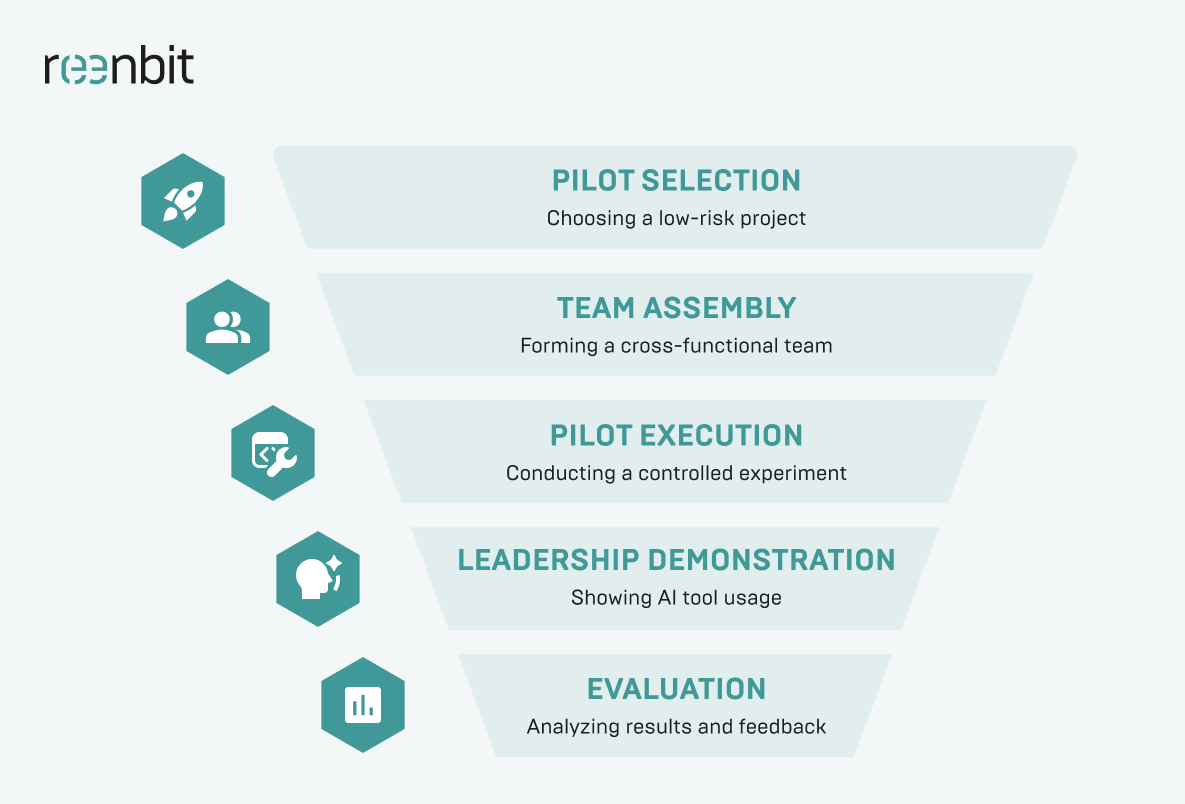
The coherent approach helps identify the most suitable AI solution for enterprise automation.
 Define Enterprise Requirements First
Avoid allowing new technology to dictate your roadmap. Instead, focus on identifying the key business challenges you need to address. Set clear process efficiency goals and determine how the AI platform will resolve specific bottlenecks in your AI development lifecycle.
Run a Controlled Pilot with Real Use Cases
Assign a small, diverse team of developers to test the AI software on a representative, non-mission-critical project. This step lets you assess adoption rates and evaluate how the tool manages the complications of your enterprise data and workflows.
Score Tools Against Technical and Business Criteria
Apply a weighted matrix that considers data security, total cost, and AI capabilities relevant to your technology stack. This objective scoring enables you to compare vendors on risk management and integration of existing systems.
Validate Results with Engineering, Security, and Leadership Teams
Have all stakeholders review the pilot outcomes to confirm the AI platform meets company standards for safety and performance. Cross-departmental validation is essential for successful adoption and for assuring the tool supports broader business functions.
Such a systematic vetting process turns subjective developer preferences into objective data, allowing your organization to select a tool with trust in its long-term viability.
How to Choose the Right AI Coding Assistant for Enterprise Use
Choosing the right tool is a balance between power and protection. At Reenbit, we have seen firsthand how integrating AI into development teams can transform team output. In our experience providing AI-assisted development services, all successful adoptions occur when the AI is treated as a collaborative partner rather than a replacement for humans.
The Reenbit’s partnership with a leading U.S. retailer perfectly illustrates the business value of this approach. With Azure OpenAI and Microsoft Fabric, our team built an efficient AI platform that unified fragmented data silos into a single source of truth.
We implemented secure solutions with Azure AD and AI-driven workflows, enabling users to ask questions in natural language. The result was incredible as Reenbit helped the client reduce manual reporting time by 70%. This case proves the following: when you implement enterprise AI that integrates with your existing systems, you will accelerate decision-making and gain a lasting competitive edge.
Conclusion: Selecting AI Solutions for Enterprise Development Teams
To wrap up, an AI coding assistant is another new part of your technical stack, and it should be vetted as such. There is no point in gaining a bit of speed if you are leaking proprietary code or creating maintenance hurdles for your development team. Real business value only comes when you move past the initial hype and pick a tool that actually fits your specific risk management rules and security standards.
Whether you need to personalize customer interactions or optimize resource allocation, the decision must be practical. Thus, focus on tools that integrate well with your existing systems and offer secure solutions you can trust. If you do the homework during the pilot phase, you will end up with a tool that will become an efficient partner for your engineering team.
FAQ
What is the best way to evaluate AI coding assistants for enterprise use?
You should conduct a multi-week pilot program where devs use the tool on real, but internal, projects. Evaluate it based on code quality, security compliance, and how well it integrates with existing systems, such as your CI/CD pipeline and Google Cloud environment.
Are AI coding assistants secure enough for enterprise environments?
Yes, but only if they offer enterprise-grade features. This includes ensuring your code is not used for AI training of public large language models and providing secure data-handling solutions. Always check for SOC 2 or similar certifications.
How do AI coding assistants fit into broader AI solutions for enterprise?
They are a subset of enterprise AI applications focused on internal productivity. Just as virtual assistants help with customer interactions, coding assistants help developers. They are part of a larger AI strategy to automate repetitive tasks across all business functions.
What metrics should enterprises use to measure AI coding assistant ROI?
Look at developer velocity, the number of bugs per KLOC (thousand lines of code), and time saved on documentation. Utilize data analysis to compare these metrics against pre-AI benchmarks and assess their true business value.
Can AI coding assistants work with private or proprietary codebases?
The best AI for enterprise solutions can. They use natural language processing and vector databases to index your private enterprise data. This enables the AI-powered tool to provide suggestions relevant to your unique architecture without ever leaking that data to the public.

