The Design-to-Code Workflow That Fixes the Handoff: BMAD, Claude Design, Claude Code

A design-to-code workflow is only as good as the handoff inside it — and the handoff is where most software teams quietly lose a third of their build. At Reenbit we wired three tools into one pipeline that closes that gap: BMAD agents carry a feature from brief to merged code, Claude Design renders the visual work, and Claude Code’s /design-sync command moves designs and code between them.
Three numbers frame the problem this pipeline exists to solve:
- 91% of developers say the design handoff process needs improvement .
- 57% of creative teams spend more than a quarter of their total work time on non-creative tasks like file management and handoff coordination.
- ~30× — how much more expensive it is to fix a defect after release than during design, per the classic defect-cost curve.
Read together, they are the handoff problem in three lines: nearly everyone agrees it is broken, it eats a large slice of build time, and every issue that slips through gets an order of magnitude more expensive downstream. Agentic development was supposed to fix this. Without a process, it mostly makes the gap faster.
What is a design-to-code workflow?
A design-to-code workflow is the end-to-end process that turns a product requirement into a visual design and then into implemented, reviewed UI code. In a traditional workflow the design lives in one tool (Figma, Sketch), the code lives in a repository, and a design handoff — spec files, redlines, developer-mode exports — bridges the two. That bridge is where meaning gets lost: edge cases, error states, and microcopy that were never written down get reinvented by whoever implements them.
An agentic design-to-code workflow replaces the manual bridge with structured artifacts and AI agents. Requirements, specifications, and design decisions become versioned files that agents read and act on, so the design intent travels with the work instead of living in someone’s memory. That is the model described below.
The pipeline at a glance
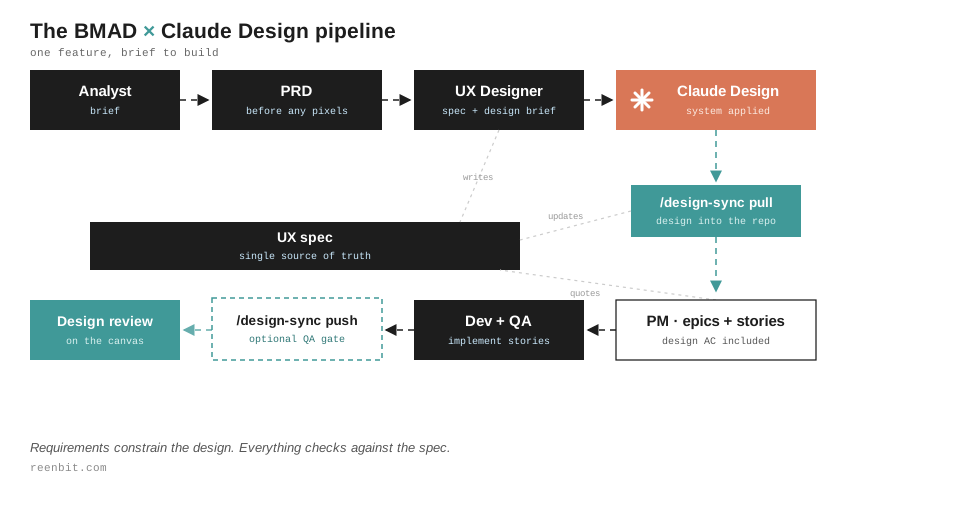
The ordering is the whole idea: requirements come first, the design renders the requirements, and the sync verifies the result.
- Analyst Agent writes the brief (market context, user problem, constraints) — before any pixels.
- PM Agent writes the PRD (functional requirements, epic scope, non-negotiables).
- UX Designer Agent produces a UX spec and a Claude Design brief derived from it.
- Сlaude Design Agent generates an interactive prototype with the design system already applied
/design-sync pullbrings the accepted design into the repo; the UX Designer updates the spec.- PM writes Agent epics and stories, quoting design acceptance criteria from the updated spec.
- Dev + QA Agents implement the stories.
/design-sync push(optional) sends the built UI back to the canvas for review.
The UX spec sits between planning and building as the single source of truth: the UX Designer writes it, the pull updates it, the PM quotes it. Requirements constrain the design; everything checks against the spec.
The stack
BMAD v6. An open-source, MIT-licensed agentic agile framework — the acronym expands to Breakthrough Method for Agile AI-Driven Development (BMAD-METHOD on GitHub).
Named agents — Analyst, PM, UX Designer, Architect, SM, Dev, QA — produce versioned artifacts under _bmad-output/ and then execute stories. Everything is a file in the repo. Everything is diffable. What is BMAD? — Reenbit’s guide to structured AI agents.
Claude Code. The runtime for the whole pipeline. Every BMAD agent runs as a Claude Code session, and the design integration lives here too — one terminal, one context, no tool-hopping.
Claude Design. Anthropic’s design tool: brief in, interactive prototype out — real HTML, not a mockup image. It holds your imported design system, so every prototype comes back on-brand without being asked.
/design-sync. The bridge, shipped in the June 2026 Claude Code update. It syncs the design system from Claude Design into your repo, and pushes implemented UI from your repo back onto the canvas, where it stays editable. This push-back step is the part most design-to-code workflows skip — and it is precisely the verification most handoff tools never provide. They deliver specs; they don’t confirm the built UI matches them.
Visual Studio Code. The workbench. The repos live here, Claude Code runs in the integrated terminal, and everything the agents produce arrives as files the team reviews like any other change.
One-time setup for the design-to-code workflow
Three things happen once per project.
1. Sync the design system as code
Run /design-sync and the design system arrives as real files — in our layout, a design-system/ folder at the repo root with token CSS, fonts, assets, and a README. From this point on, agents reference tokens and components by their real names instead of describing colors from memory. Design system as code is what keeps the prototype and the implementation from drifting into two different products.
2. Grant design consent (a permission gate, not a generator)
This one tripped us up, so learn from our confusion: /design is a permission switch, nothing more
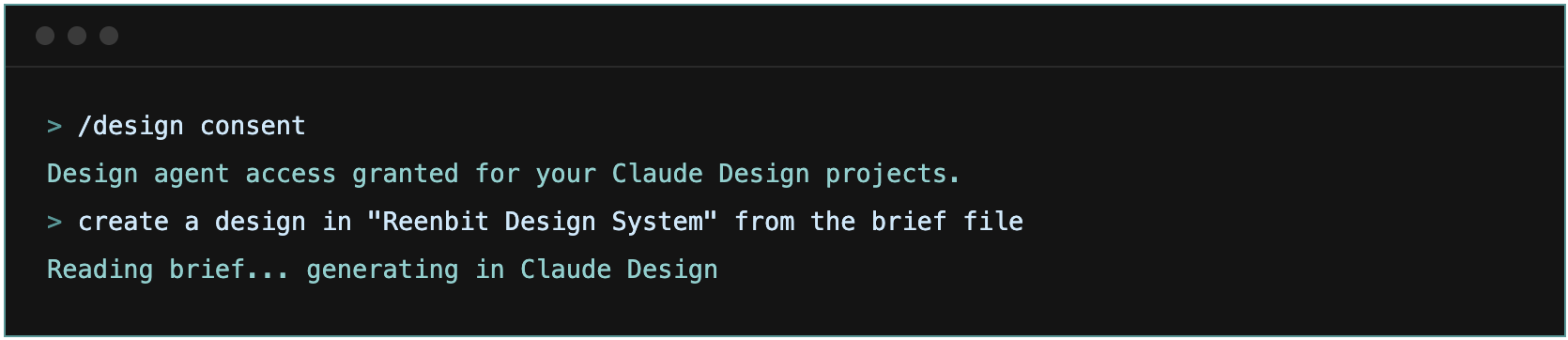
Run /design consent once. consent and revoke are the only subcommands it accepts — passing it a brief file does nothing but print usage. After consent, generation happens through design tools that Claude Code calls when you ask in plain language: “Read the brief file and create a new design in the Reenbit Design System project — don’t summarize it, pass the full brief.”
If generation still doesn’t fire, climb this ladder in order: update the CLI first (claude update, then restart the session — the design integration iterates weekly); if Claude Code reports no design tools after consent, wire the MCP server explicitly with claude mcp add --scope user --transport http claude-design https://api.anthropic.com/v1/design/mcp, restart, and ask again in plain language. The fallback that always works: paste the brief into your project at claude.ai/design. Our UX Designer marks every brief “paste-ready” in its front matter for exactly this case — you lose the terminal convenience and nothing else, and the pull afterward works the same.
3. Give the UX Designer a prompt template
A small BMAD task that always emits the same brief structure — screens, PRD constraints by ID, scope boundaries, components to reuse by real name. Templated briefs are the difference between a pipeline and a folder of one-off experiments.
The workflow, step by step
The tools matter less than the sequence. Requirements come first; the design renders the requirements; the sync verifies the result.
- Analyst writes the brief. Market context, user problem, constraints. Pure research — the Analyst never touches design. Mixing those two jobs is the most common mistake we see teams make.
- The PRD gets written. Functional requirements, epic-level scope, the non-negotiables the design must respect. This document exists before anyone has seen a pixel. When the design comes first, the PRD ends up transcribing the prototype — flaws included.
- UX Designer produces the spec and the design brief. A UX spec (screens, components, states, breakpoints) and a Claude Design brief derived from it, both in
_bmad-output/planning-artifacts/ux-designs/. The brief pulls real component names from the synceddesign-system/files. - Claude Design generates. Ask Claude Code in plain language to create the design from the brief file, or paste the brief into the project at
claude.ai/design. The design system is already there, so the prototype comes back on-brand. Visual iteration happens on the canvas — genuinely better there than in any text channel. - UX Designer reads the result back. Once a design is accepted, pull it via
/design-syncand write the findings into the UX spec: which components materialized, where the design deviated, which states exist as built. This is the load-bearing step. Skip it, and stories get written from memory of the design instead of from the design. - PM writes epics and stories. Stories carry design acceptance criteria quoted from the updated spec. The Dev agent gets constraints, not screenshots.
- Dev implements, QA reviews. The standard BMAD story cycle. Nothing exotic — which is the point. Design context arrived through the same document channel as everything else.
- Optionally, push the build back. Before PR review,
/design-synccan send the implemented UI to the canvas, editable, next to the original. We treat it as an optional gate: use it when someone reviews on the canvas, when designs get reused, or when a screen has rules that are easy to fudge. For those screens, run it at least once.
What a good design brief looks like
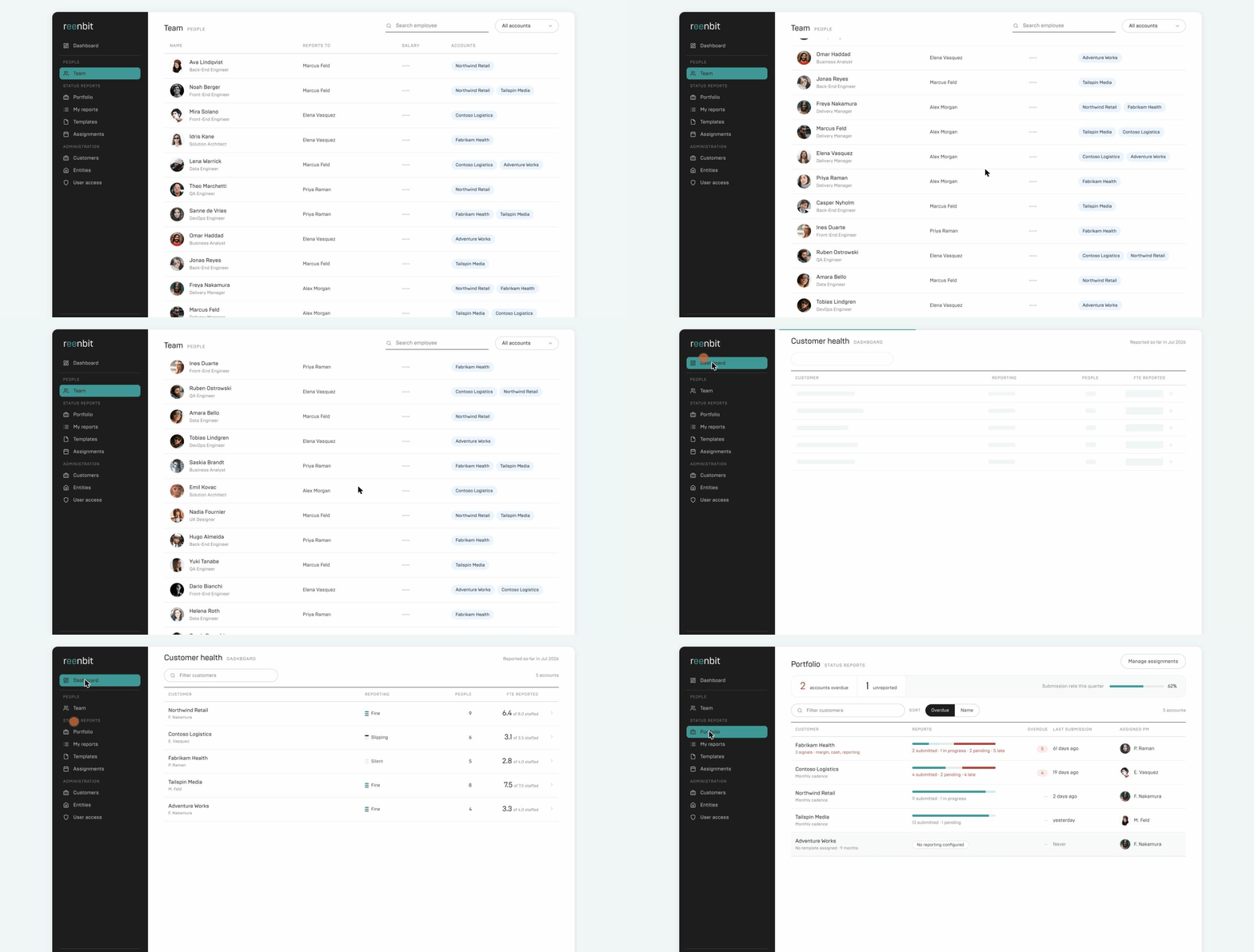
The brief our UX Designer generated for the pilot ran to several pages. That length was the point.
It opened with a “what not to use” section. Our Claude Design project also holds the marketing site’s UI kit, and without that section the app comes back looking like a landing page.
It spelled out every button label and status message word for word, so the generator couldn’t invent its own microcopy. And it described the main screen as eight separate states — because generators love to merge states, and counting them at review is the fastest acceptance check there is. This directly answers the “spec gap” that plagues traditional handoffs, where files show the happy path but omit error, loading, empty, and edge states.
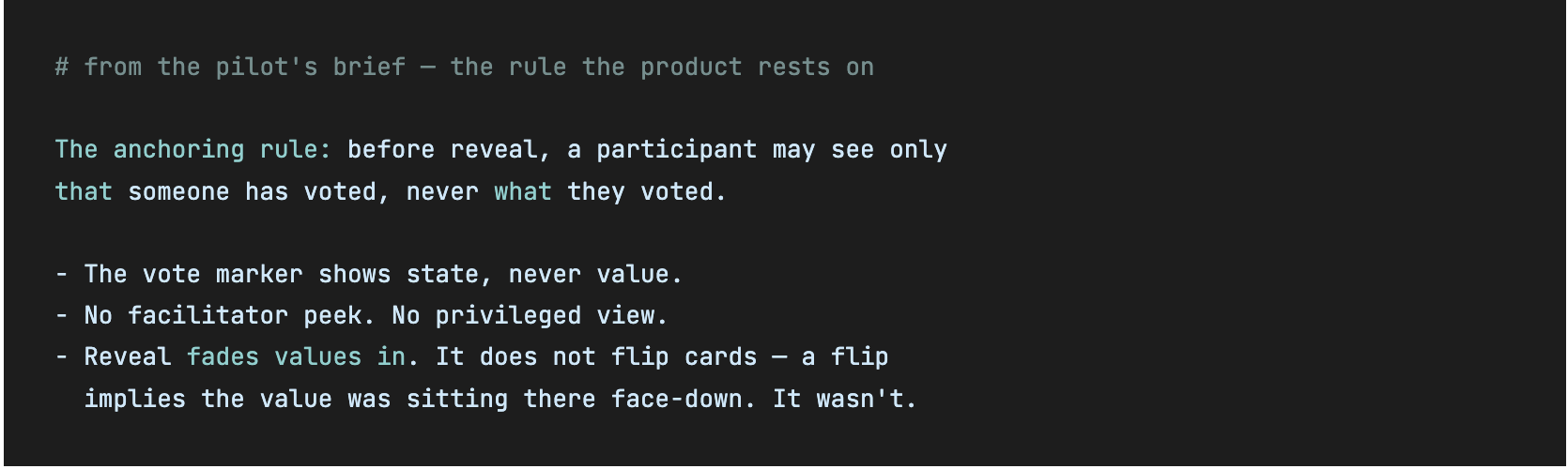
When the brief carries the reasoning, not just the rules, the reviewer can catch violations the checklist missed.
One principle held from the simplest brief to this one: the brief carries requirements and scope; the design system carries the styling. Reference tokens and components by name. If a value must be pinned, treat the synced CSS as the source of truth and the brief as a dated snapshot.
What breaks the design-to-code pipeline
Five failure modes account for nearly everything that went wrong when we deviated from the process.
- The Analyst writes design briefs. That is the UX Designer’s task. The UX Designer derives the brief from a spec, so there is a document to verify against later. An Analyst-written brief is a chat message with no spec behind it.
- Design before the PRD. Acceptance criteria get reverse-engineered from pixels, flaws included. Requirements must constrain the design, not chase it.
- Hex codes and font names in briefs. Two sources of truth diverge. Import the design system once and reference it by name.
- Pulling the design but never updating the spec. The pulled files become decoration and stories get written from memory. The spec update after the pull is the load-bearing step.
- Treating the prototype as the source of truth. Prototypes are disposable by design. The spec survives redesigns, grounds the stories, and is what everything gets checked against.
Practical notes from running this daily
The consent gate is one-time but non-obvious; if /design keeps printing usage at you, that is the whole story — it has no other mode, and the fix is to ask in plain language, not rephrase the command.
The sync is beta, and its exact behavior is worth testing on your own setup before you write process docs around it. We found the push direction worked precisely as documented, while the shape of what a pull returns for a freshly generated design took experimenting. Budget an afternoon of poking before the first real feature.
In our experience, Claude Design draws on the same usage headroom as Claude Code and chat rather than a separate pool, so on heavy design days you feel it — we batch design exploration early in the sprint. (Usage policies can change; check current limits before you plan around them.)
And leave room to explore. The UX Designer can run a design spike before the PRD is final, feeding it into requirements as research. It just never becomes the design of record. That distinction sounds bureaucratic. It is the difference between a pipeline and a pile of chats.
The one-line summary: the prototype is disposable; the UX spec is the source of truth. Claude Design renders the spec, and /design-sync keeps design and code honest.
Conclusion
A design-to-code workflow breaks at the handoff, and no amount of AI speed fixes a process that has none. What worked for us was old discipline applied to new tools: write the requirements first, let the design render them, keep one specification as the source of truth, and verify the build against the design before it ships. BMAD agents, Claude Design, and /design-sync are how we run it — but the sequence is the point, and it is portable to whatever stack you already use.
If you want this pipeline on your product, Reenbit delivers fixed-price outcomes with AI-native pods — BMAD methodology, Azure and .NET depth, and design-to-code workflows like the one above.
FAQ
What is a design-to-code workflow?
A design-to-code workflow is the process of turning a product requirement into a visual design and then into implemented UI code. It spans the brief, the spec, the prototype, the handoff, and the build. The bottleneck is usually the handoff, where design intent is lost in translation between a design tool and a code repository.
What is the BMAD method?
BMAD (Breakthrough Method for Agile AI-Driven Development) is an open-source, MIT-licensed agentic framework in which named AI agents — Analyst, PM, UX Designer, Architect, SM, Dev, QA — produce versioned artifacts and execute development stories inside your own coding environment. It structures AI-assisted development instead of relying on ad-hoc prompts.
What does /design-sync do in Claude Code?
/design-sync is a Claude Code command that connects Claude Design and your repository. It pulls a design system or an accepted design into the repo as real files, and can push implemented UI from the
How much does a broken design handoff actually cost?
Industry data puts the cost of fixing a defect after release at roughly 30× the cost of fixing the same issue during design. Meanwhile, 91% of developers say the handoff process needs improvement. A structured design-to-code workflow attacks both numbers by catching mismatches before they reach code.
Do I need Claude Design to run an agentic design-to-code workflow?
No — the principles (requirements before design, a spec as the source of truth, design system as code, a verification step that compares build to design) are tool-agnostic. Claude Design and /design-sync are how Reenbit implements them, but the sequence is what does the work.
Why keep the UX spec, not the prototype, as the source of truth?
Prototypes are disposable and get regenerated on every iteration. The UX spec survives redesigns, grounds the development stories, and is the artifact everything gets checked against. Writing stories from the prototype instead of the spec reintroduces the handoff errors the workflow is meant to prevent.